

Viewing Article
 | Nov 28 2011, 2:35 PM |

Below are the instructions on how to change the router password on your Sharedband Netgear routers.
This will need to be done on ALL Sharedband Routers.
Step 1
Log onto the web interface of the router (e.g. http://192.168.3.x - where x is the node number). The username/password will be either admin/password or admin/Bonding123 when prompted.
Step 2
Select 'Maintenance > Set Password'.
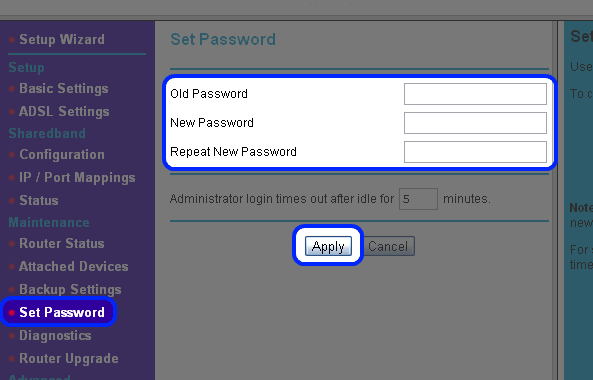
Now put the current password in 'Old Password', then your desired new password in both 'New Password' and 'Repeat New Password', once completed click apply.
The new password should now be active. You can verify this by going to the Router Status page, where you should then be prompted for the new password.