

Viewing Article
 | Jan 7 2011, 3:10 AM |

Introduction
This is a quick guide on the basics of Sharedband 'Port Mappings' and 'Host allocations'. It describes the differences between them and how to set them up.
There are three types of port mapping:
i) Forwarding individual ports or scopes of ports (maximum scope size = 5000 ports) like you would with any home router.
ii) A Host allocation is much like a DMZ, it forwards all ports and protocols to the specified IP address.
iii) Protocol Forwarding can be used when a single protocol needs to be forwarded. An example of this would be for the use of IPSEC VPNs.
Accessing the Port Mapping screen.
Via the Customer Portal
Log on to our online NOC customer portal (the URL and logon user name/password are included on your welcome letter).
Select Configuration from the top menu then select IP Address Mapping or IP Management from the left hand screen.
Adding Port Mappings and Host Allocations.
Regardless of which method you used to get to this screen, these screens are the same.
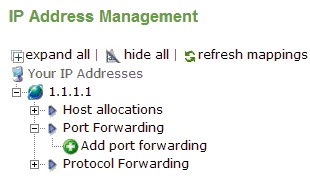
You will see a screen very similar to the above screenshot. This community has one static IP and it’s currently the default outgoing address (indicated by the picture of a globe to the left of your IP address).
The default outgoing address is the address used if no other rules exist (see host allocations below for further explanation).
To add a port mapping or port forward, expand the relevant IP and click on Add port mapping or Add port forward and you will be presented with the screen below.

Select the Service Type
The Public IP address
Either the Range or a Single port.
Specify the Destined Private IP of the private (LAN) machine and the Destination Port.
Destination Port allows you to change which port the connection goes to. For instance you may wish to make your web server available on port 8080 but don't wish to alter the web server's config. When creating the port mapping enter port 8080 in the “Map port” field and port 80 into the Start Destination Port. Sharedband will forward port 8080 internet traffic to port 80 on your server. Start Destination Port is an advanced feature and most people will want to just input the first port number again.
Host Allocations
As mentioned above, Host allocations are much like a DMZ in a home router. They forward all ports and protocols to the specified IP address.
If you only have 1 static IP address, when you create a host allocation you will have to delete any 'Mapped Ports' that have previously been established along with your default outgoing address. Deleting your default outgoing address means Sharedband is no longer performing NAT for all other hosts on your network. If you are applying a Host Allocation to forward all ports and protocols to your firewall then this will be fine because the router/firewall will NAT for you. If you are not using a router firewall you may need to speak to support. Please raise a ticket.
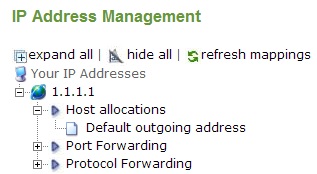
CAUTION THIS WILL DISCONNECT THE INTERNET SERVICE AND SUBSEQUENT STEPS MUST BE PERFORMED ON A NON-SHAREDBAND INTERNET CONNECTION...
If present, click on Default Outgoing Address and accept the delete confirmation.
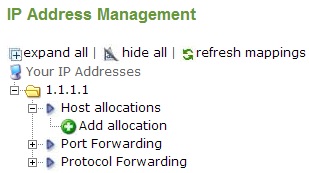
Click on Add Allocation.
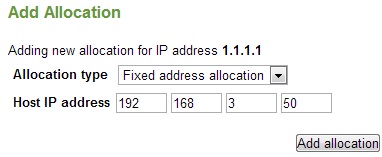
Select Fixed Address Allocation from the drop down list and then enter the static WAN IP address of the device that you want to forward everything to.
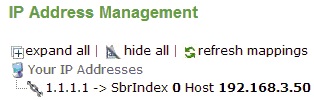
Here is a screenshot showing a host allocation from the public ip 1.1.1.1 to the private ip 192.168.0.50.
If you want to delete a Host Allocation, just click on the mapping and you will be asked if you want to delete it. Once confirmed, you will probably wish to reinstate the Default Outgoing Address along with any required port mappings.
FAQ's
Q: How do I forward just GRE (PPTP) or ESP (IPSEC) to an address?
A: Protocol Forwarding can be applied. See above section for more details: Adding port mappings and host allocations.
Q: Are the port mappings TCP or UDP?
A: Both, selecting a port to map down (e.g. port 25) will forward UDP and TCP port 25 to the specified IP address.
Q: Important - You are seeing this message because your Sharedband community is setup incorrectly.
A: This is because you either don't have a default outgoing address applied or if a host allocation address is configured, your computer is utilising an IP address that is not routing either directly or indirectly through this host allocated address.
Review the "IP Management" screen to view your current port mappings/host allocations and if you are still having difficulty, the following advice should help you resolve it:
1. You have just set up a host allocation but your PC or device is not using the IP address you specified.
Please check the IP address you entered in the NOC and the actual IP address the device is using.
2. You normally use a VPN/Firewall device but you have plugged a PC directly into the sharedband routers.
If you wish to test a particular issue without your VPN/Firewall you should either disconnect the firewall device and configure your PC to be on the same IP address as the host allocated address or you can follow the above guide to remove the host allocation and reinstate the default outgoing address (not recommended).
3. You use a VPN/Firewall device and it has been deployed for weeks/months but now you are getting this message.
This is normally because your VPN/Firewall device has been set to obtain its IP address via DHCP and somebody has used that address to do the host allocation.
For reasons unknown, your device has now got a different IP address to the one in the host allocation and traffic has stopped flowing.
Move you VPN/Firewall device to a static address that is not in the DHCP pool (we normally use .50). Afterwards, amend the IP address configured in the host allocation to reflect the new address.
4 None of the above senarios.
Its extremely rare for this to be the case. We would recommend you raise a ticket
If you are seeing this problem out of hours and need a quick fix you can follow the delete a Host Allocation information.
Before proceeding, note that its very likely inbound VPNs, exchange servers and other port mappings will stop working. If you have somebody that deals with your IT on your behalf we would highly recommend you speak to them first.
Please raise a ticket if you need more help with this issue.